Welcome to Markplex tutorial 38 in this collection of tutorials designed to teach TradeStation EasyLanguage programming skills. EasyLanguage is a programming language that was developed for the TradeStation trading platform that can be used to write programs to help in the trading of foreign exchange (forex), commodities (e.g. the e-mini), options and stocks. Please join our email mailing list if you have not already done so and we will let you know when we release new tutorials or programs.
In earlier tutorials I demonstrated several ways of showing higher time frame pricing information on a shorter time frame chart (e.g. 60 minute information on a 5 minute chart). As I mentioned before, in order to use a strategy’s ‘intra-bar-order-generation’ capability it is not possible to have multiple data streams inserted into a chart. Although the tutorial demonstrates the principles by using an indicator, the method discussed in this tutorial would allow you to create a strategy without using multiple data streams and therefore could be used in a strategy with intra-bar-order-generation set to true.
Another advantage of using ADE to derive bars within a strategy is that its is then possible to set the ‘big bar’ interval (i.e. 60 minutes in this example) as an input which can then be optimized.
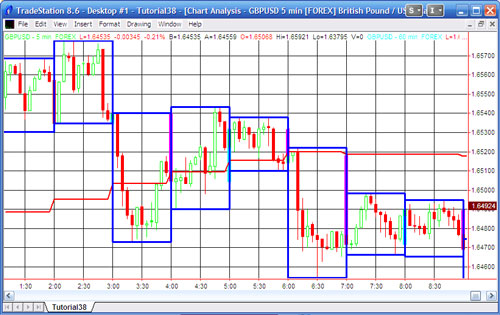
The following screen grab shows what our screen will look like after the tutorial is applied. The blue boxes show the equivalent 60 minute “big bars” derived from the ten minute bars. The cyan and magenta bars are actual 60 minute bars. The red indicator shows the 60 minute moving average based on the ‘big bars’ derived from the 10 minute bars.
In this tutorial we use several functions and a DLL included with the ADE (All Data Everywhere) and ELCollections DLL and associated programs. In order to implement this tutorial you will need to install EL Collections and ADE, if you have not already done so. Full instructions for the install can be found on the TradeStation support site.
See the following links (you will need to be logged into the forum):
All-Data-Everywhere (ADE) library
I suggest that you also download and print out the ADE and EL Collection notes that are included with the downloads. You will find them invaluable as you explore other features of these extremely useful programs.
This program is available for immediate download for $29.95 by clicking the following button to pay using PayPal or credit card.
Before importing these programs you must install ELCollections and All Data Everywhere (ADE) on your computer. ELCollections and All Data Everywhere (ADE) and their installation instructions may be found at the TradeStation EasyLanguage forums.
When you import the tutorial 38 programs I recommend that you make sure _DrawBox3, _tutorial38 and _tutorial38a are selected and deselect all other programs (i.e. those that begin with ADE, ADF, ListN, MAPNC, MAPNN, MAPNS, and MAPSC).
TO THE BEST OF MARKPLEX CORPORATION’S KNOWLEDGE, ALL OF THE INFORMATION ON THIS PAGE IS CORRECT, AND IT IS PROVIDED IN THE HOPE THAT IT WILL BE USEFUL. HOWEVER, MARKPLEX CORPORATION ASSUMES NO LIABILITY FOR ANY DAMAGES, DIRECT OR OTHERWISE, RESULTING FROM THE USE OF THIS INFORMATION AND/OR PROGRAM(S) DESCRIBED, AND NO WARRANTY IS MADE REGARDING ITS ACCURACY OR COMPLETENESS. USE OF THIS INFORMATION AND/OR PROGRAMS DESCRIBED IS AT YOUR OWN RISK.
ANY EASYLANGUAGE OR POWERLANGUAGE TRADING STRATEGIES, SIGNALS, STUDIES, INDICATORS, SHOWME STUDIES, PAINTBAR STUDIES, PROBABILITYMAP STUDIES, ACTIVITYBAR STUDIES, FUNCTIONS (AND PARTS THEREOF) AND ASSOCIATED TECHNIQUES REFERRED TO, INCLUDED IN OR ATTACHED TO THIS TUTORIAL OR PROGRAM DESCRIPTION ARE EXAMPLES ONLY, AND HAVE BEEN INCLUDED SOLELY FOR EDUCATIONAL PURPOSES. MARKPLEX CORPORATION. DOES NOT RECOMMEND THAT YOU USE ANY SUCH TRADING STRATEGIES, SIGNALS, STUDIES, INDICATORS, SHOWME STUDIES, PAINTBAR STUDIES, PROBABILITYMAP STUDIES, ACTIVITYBAR STUDIES, FUNCTIONS (OR ANY PARTS THEREOF) OR TECHNIQUES. THE USE OF ANY SUCH TRADING STRATEGIES, SIGNALS, STUDIES, INDICATORS, SHOWME STUDIES, PAINTBAR STUDIES, PROBABILITYMAP STUDIES, ACTIVITYBAR STUDIES, FUNCTIONS AND TECHNIQUES DOES NOT GUARANTEE THAT YOU WILL MAKE PROFITS, INCREASE PROFITS, OR MINIMIZE LOSSES.
Tutorial 38 Part 1 Video – Create ‘big bars’ using the ADE DLL and associated functions
Tutorial 38 Part 2 Video – Create ‘big bars’ using the ADE DLL and associated functions
Tutorial 38 Part 3 Video – Create big daily or monthly bars using the ADE DLL and associated functions
This program is available for immediate download for $29.95 by clicking the following button to pay using PayPal or credit card.
Before importing these programs you must install ELCollections and All Data Everywhere (ADE) on your computer. ELCollections and All Data Everywhere (ADE) and their installation instructions may be found at the TradeStation EasyLanguage forums.
When you import the tutorial 38 programs I recommend that you make sure _DrawBox3, _tutorial38 and _tutorial38a are selected and deselect all other programs (i.e. those that begin with ADE, ADF, ListN, MAPNC, MAPNN, MAPNS, and MAPSC).
If you see any errors in this tutorial – or we have not made something clear, we would be most grateful if you could please let us know. E-mail us at: tutorials@markplex.com. Also, let us know if you have any ideas for new tutorials.